
End-to-End RAG Architecture for GitLab-Driven Code Embedding and Retrieval in VSCode
A client approached me with a request: they wanted to implement a Retrieval-Augmented Generation (RAG) system capable of answering questions directly from their GitLab-hosted source code. Since our unit handles multiple clients with similar needs, I designed a generalized, scalable solution—one that automatically transforms GitLab repositories into embedded vector databases accessible through real-time queries in VSCode. What follows is a detailed breakdown of the system architecture and implementation.
Overview
This article documents a complete Retrieval-Augmented Generation (RAG) pipeline designed to ingest, embed, and serve GitLab-hosted code repositories as queryable vector databases directly within VSCode. The system is optimized for automation, minimal resource consumption, and real-time access during development workflows.
Use Case
This system is ideal for teams working with large codebases who want to enable natural language understanding of source code. Instead of manually searching through files or relying on static documentation, developers can ask semantic questions directly inside VSCode and receive contextually relevant results in real-time.
Objectives
- Enable VSCode to query embedded source code with rich semantic context.
- Automate repo updates through GitLab push events.
- Avoid reprocessing unchanged files.
- Provide low-latency retrieval via FastAPI and Qdrant.
Key Challenges
- Avoiding redundant embeddings: Solved using content-based UUIDv5 hashing and chunk-level diffing.
- Handling large repositories: Implemented lazy chunking + batch embedding with streaming upload to Qdrant.
Stack
- Backend Language: Python
- Database: Qdrant (Vector DB)
- Embedder: Qwen3-Embedding:8B (via HTTP API)
- LLM Model: LLaMA3:70B (via HTTP API)
- Automation: n8n (CI orchestrator)
- Editor Integration: Continue plugin in VSCode
- Web Service: FastAPI
System Architecture
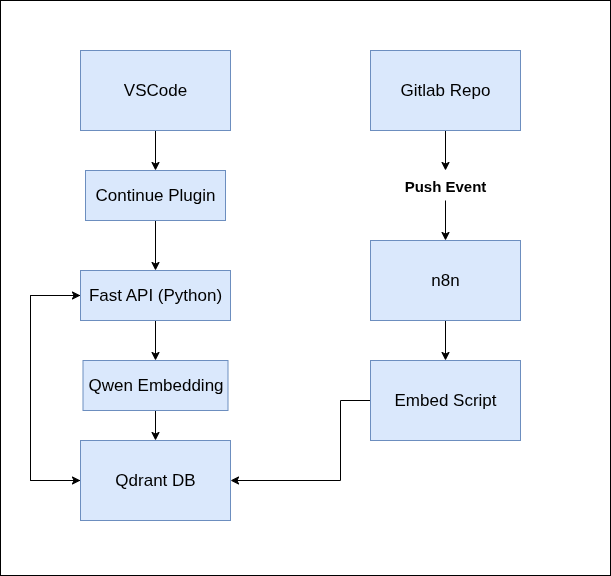
Diagram
Refer to the included diagram that maps the entire data flow from GitLab to Qdrant and VSCode. It includes the following core components:
- GitLab Repo
- n8n CI Flow
- Embed Script + embed_api
- Qwen3-Embedding API
- Qdrant Vector DB
- Continue Plugin (VSCode)
- FastAPI (/context endpoint)
Component Breakdown
1. GitLab Repo
The source of truth for all code artifacts. Each time a user pushes code, it triggers a webhook (or poll-based) event that is captured by n8n.
2. n8n Automation Layer
This orchestrates the entire embedding pipeline. On a GitLab push event:
- Clones/pulls the updated repository.
- Runs the embedding script (main Python program).
This ensures your vector DB reflects the latest state of the codebase with no manual intervention.
3. Embedding Logic (Python Backend)
Directory Structure
main.py: Entry script that walks the repo and determines which files changed.embed_api/:embedFile: Handles chunking, deduplication, file-level embedding.chunk: Creates vector + metadata and uploads them.
Optimization Features
- Only processes new/updated files.
- Skips already-embedded chunks by checking:
- File hash (SHA-256)
- Chunk hash
- Deletes chunks from Qdrant for files no longer present.
Chunk Metadata Schema in Qdrant
{
  "id": "UUIDv5(filepath_hash_chunk_index)",
  "chunk_hash": "SHA-256",
  "parent_filepath": "relative/path/to/file",
  "parent_file_hash": "SHA-256",
  "text": "raw chunk text",
  "vector": [ ... ] // size 4096
}
4. Qwen3-Embedding:8B
This model is exposed via HTTP API and handles all embedding:
- Embedding file chunks
- Embedding user queries (via FastAPI)
It returns a fixed-size (4096) vector representation.
5. Qdrant Vector Database
This serves as the persistent storage for all embedded vectors.
- One collection per project/repo
- Each vector includes full metadata
- Fast top-K similarity search
6. FastAPI Server (/context Endpoint)
Handles semantic query requests from the Continue plugin in VSCode.
Query Flow:
- Receives
queryandcollectionname - Embeds query using Qwen3-Embedding
- Searches Qdrant for top-K matches
- Returns matching chunks as JSON
Sample Response:
[
  {
    "text": "def process_file(self):\n ...",
    "filepath": "src/embedder/embed_api.py",
    "score": 0.92
  },
  ...
]
7. VSCode + Continue Plugin
Continue is configured to use the RAG system as a custom context provider.
config.yaml
- provider: http
  params:
    url: "http://192.168.0.200:8080/context"
    title: "Qdrant Project-Name RAG"
    displayTitle: "Project-Name RAG"
    description: "Retrieve context from Qdrant for project <blank>"
    options:
      collection: "project-name"
This enables project-aware, context-enriched completions inside the editor.
Final Flow Summary
- Developer pushes code to GitLab
- n8n is triggered
- Repo is pulled locally
- Embedding script runs:
- Chunks code
- Embeds using Qwen3
- Uploads new chunks to Qdrant
- Removes stale chunks
- Developer uses VSCode
- Continue sends query to FastAPI
- FastAPI embeds query and fetches top-K chunks from Qdrant
- Chunks appear in VSCode completions
This system provides a developer-first, semantically aware code search pipeline built for real-time engineering workflows.